
Maintaining your own wallet is a bit more complicated – but only slightly. If you know how to download files, install applications, and browse your computer’s file structure, you should be OK.
First, visit http://Bitcoin.org and download and install the latest Bitcoin client for your Operating System.
Start your Bitcoin client. Initially, you won’t have any Blockchain data so no transactions or balances will be present. You’ll have to be patient and allow the Blockchain to be build from other peers on the Internet. This could take hours to days depending on your situation. Once your Blockchain is up to date, you will be ready to start receiving and sending Bitcoins.
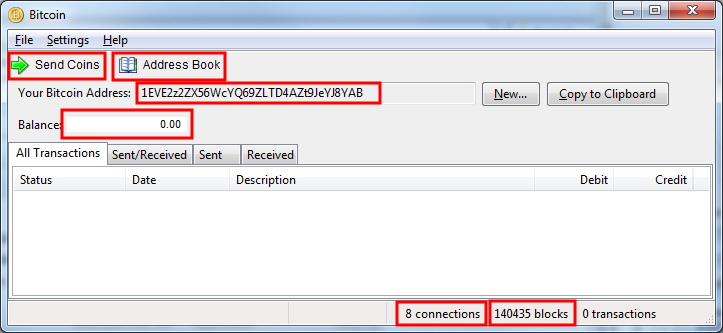
The Client Interface
Bitcoin Addresses
Bitcoin addresses are 33-34 alpha-numberic characters long and always begin with a ’1′. An important point of Anonymity for you consider going forward is to try and create/use as many different receiving addresses as possible when collecting Bitcoins. It is not required, but will certainly assist your efforts to be anonymous.
If you plan on making regular payments to specific Bitcoin addresses, We highly recommend you add these Bitcoin addresses to your address book. It will save you a lot of time and give you a little more security that you’re getting the destination address correct.
Wallet Encryption
Wallet Encryption allows you to password protect your wallet. If your wallet file is copied or otherwise stolen, it will be useless to the thief unless they can get that password you stored under your keyboard too (DON’T DO THAT!).
To enable Wallet Encryption, click Settings | Wallet Encryption” and enter your password. Make it a strong one and don’t forget it!!!
Caring for your Wallet
It is essential to frequently backup your Wallet, store it in multiple locations, and verify your backup is good. The file you need to worry about is in your profile/home directory under “.bitcoin” and will be called wallet.dat. This file contains the cryptographic keys for spending your Bitcoins. If this file is lost, corrupted or destroyed, you may lose some or all of your Bitcoins so take good care of it.
You must prevent unauthorized access to this file. If someone can copy it by any means, even if it is password protected/encrypted, they might be able to crack the password and spend the Bitcoins from their own client and there will be nothing you can do to stop it.
Frequent backups of your wallet are necessary because as Bitcoins are spend, additional Bitcoin addresses may be created. If you try to restore an old wallet file after this point, you may lose access to fractions of your Bitcoin balance.