
Offline storage of Bitcoins is the most secure way to protect your Bitcoins from theftware(malicious software designed to steal financial information or currency).
An off-line Bitcoin address is one that has never been exposed to keyloggers or other malicious software. It is now extremely easy to generate these extremely safe addresses. We recommend you follow this procedure to create several Bitcoin addresses and distribute your coins across each address. Doing so will protect the value you don’t need when it comes time to bringing them online and spending them.
For example, if you need to store 1000 Bitcoins, rather than store all 1000 in a single Bitcoin address, store 100 Bitcoins in 10 addresses. Later, if you need to spend 150 Bitcoins, you only need to import two wallets. If malware was present on your computer during the import process, only 100 Bitcoins at a time would be vulnerable to digital theft compared to the entire 1000.
Important: If you’re only storing a small saving off-line, these procedures might be enough security for you. However, if you are going to be storing a large number of Bitcoins off-line, you will want to take more precautions to ensure your computer is malware free before doing these steps. Such procedures would include booting your computer with a Live CD, or building a computer from scratch without ever letting it connect to another computer on the Internet.
Creating Off-line Bitcoin addresses
Visit http://BitAddress.org and unplug your computer from the Internet. Alternatively, you can simply set your browser to “offline” mode. This will block your browser from communicating to a web site while you’re generating and printing your keys.
Go to the “Paper Wallet” tab and click Generate a few times until you feel you got some magical numbers. Once is enough, but hey, they are free!

Once you’re happy with your addresses, print them out. Feel free to go overboard with this – if you only think you need 10 addresses, print out 20. They may come in handy later.
While each page is displayed, copy the Bitcoin Address and add it to your Bitcoin client as a sending address. Label it so that it is easily recognizable as one of your own an off-line addresses.

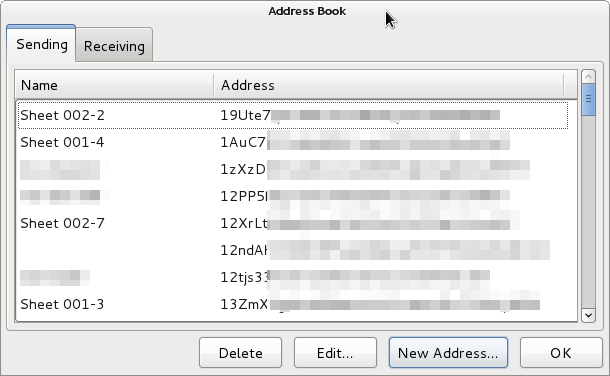
With your offline addresses saved in the client, close your browser and reconnect your Internet. Do not enable your browser’s online mode until you restart it.
Now you’re ready to distribute your Bitcoins to your Off-line addresses. After doing this, you will be unable to spend those Bitcoins until you import the Private Key portion on the printed sheet.
Retrieve Your Bitcoins
So, you want to spend some of those secured Bitcoins… Lets bring some back to life!
Currently, the .4 version of the Bitcoin client does not allow you to import keys so you’ll have to use another service to access your money.
 A simple and cost effective way is to simply import the private keys into an exchange where you can immediately trade or withdraw your Bitcoins.
If you don’t have an exchange account, you’ll need to use an online wallet service to import your private key and send the money back to your wallet. StrongCoin is providing this service for 1% up to a maximum of 1 BTC. Soon, however, the native client will allow this function for free.
Follow the instructions listed for Project: Hidden Treasure to import your key. But rather than choosing ‘Mini-key” import, you’ll want to choose the “Base58 encoded” option.
Once you have successfully imported the key, you’ll be able to spend the Bitcoins back to your original wallet (under a different Bitcoin address).